

ELD violations are among the most frequently cited findings at roadside inspections and one of the primary drivers of Hours of Service Compliance BASIC scores. This guide covers the most common ELD violations, what each means for the driver and the carrier, and the specific steps to prevent them.
The Electronic Logging Device mandate has been fully in effect since 2019. Most carriers have made the transition from paper logs. But having an ELD is not the same as being ELD-compliant. The FMCSA’s roadside inspection data consistently shows that ELD-related violations remain among the most common findings. Not because carriers haven’t installed the devices, but because drivers and carriers are making predictable, preventable mistakes in how those devices are used.
ELD violations affect the Hours of Service Compliance BASIC in the SMS system, which directly impacts carrier safety scores, shipper relationships, and the likelihood of a compliance review. For drivers, ELD violations can result in out-of-service orders that sideline them for hours or days. For carriers, a pattern of ELD violations is a signal to the FMCSA that HOS compliance is not being managed effectively.
This guide identifies the most common ELD violations seen in roadside inspections and compliance reviews, explains the regulatory basis and consequences of each, and provides specific, actionable steps to prevent them.
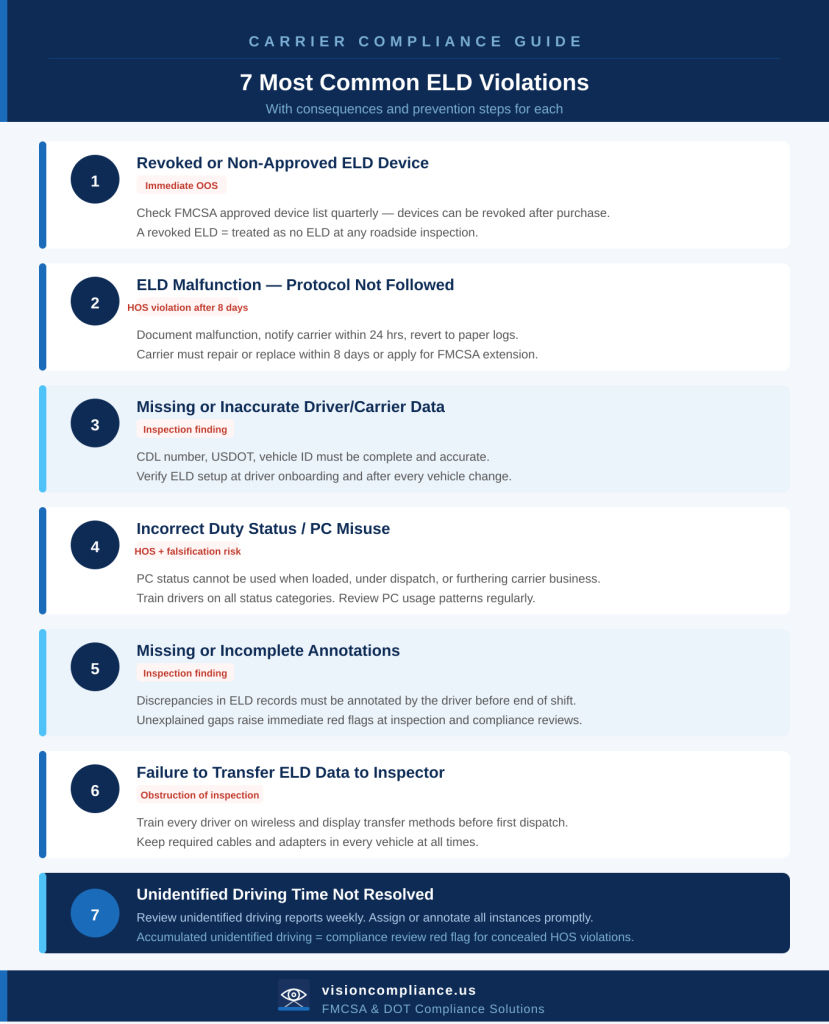
Using a Revoked or Non-Approved ELD Device
This is the most immediately consequential ELD violation and one of the most preventable. The FMCSA maintains a current list of approved ELD devices at fmcsa.dot.gov. Devices on the list have been certified by the manufacturer to meet federal technical standards. The FMCSA also maintains a list of revoked devices. ELDs that were previously approved but have since been removed from the approved list due to non-compliance.
A driver operating with a revoked ELD device is treated as operating without an ELD. This results in an immediate out-of-service order at any roadside inspection. The driver cannot continue operating until the violation is resolved, which, in a roadside inspection scenario, typically means waiting for a replacement or reverting to paper logs.
Why it happens: Carriers select an ELD at onboarding and assume the device remains compliant indefinitely. The FMCSA revokes ELD certifications on an ongoing basis. The approved device list changes. A device that was compliant when purchased may be revoked months later. Carriers that don’t monitor the list have no way of knowing.
How to prevent it: Check the FMCSA ELD device list quarterly. Set a calendar reminder. When you select an ELD provider, confirm that they notify customers of any certification changes. If your device is revoked, replace it immediately. Do not continue operating.
ELD Malfunctions Not Properly Handled
ELD devices malfunction. When they do, the federal regulations establish a specific protocol that must be followed. Failure to follow the protocol or continuing to operate as if no malfunction occurred is itself a violation.
When an ELD malfunctions, the driver must:
- Note the malfunction on the ELD (if the device still permits any interaction)
- Notify the motor carrier within 24 hours of the malfunction
- Reconstruct the current day’s records of duty status using paper logs
- Continue using paper logs for up to 8 days while the carrier arranges repair or replacement
The carrier must repair or replace the ELD within 8 days of the malfunction. If the carrier needs more time, they must apply to the FMCSA for an extension. Operating beyond 8 days without a functioning ELD — without an extension — is a violation.
Why it happens: Drivers don’t know the malfunction protocol. They continue driving without documenting the malfunction, don’t notify the carrier, and don’t revert to paper logs. The carrier doesn’t follow up to ensure repair within 8 days.
How to prevent it: Train every driver on the malfunction protocol before the first dispatch. Keep paper log forms in every vehicle. Establish a carrier procedure for tracking and resolving ELD malfunctions within the 8-day window.
Inaccurate or Missing Driver Information in ELD Records
ELD records must contain specific data fields for each driver. Missing or inaccurate information in these fields is a violation that appears in inspection reports and can affect BASIC scores.
Required ELD data elements include:
- Driver’s name, CDL number, and CDL issuing state
- Motor carrier name and USDOT number
- Vehicle identification, CMV unit number, or VIN
- Driver’s home terminal time zone
- 24-hour period start time
Errors in these fields, particularly the driver’s CDL information or the carrier’s USDOT number, are common findings at inspections. They suggest inadequate ELD setup, which can complicate the inspection process significantly.
How to prevent it: Verify ELD setup for every driver at onboarding. Confirm all data fields are complete and accurate. When drivers change vehicles, ensure the vehicle information is updated in the ELD. Conduct periodic spot-checks of ELD records to identify data entry errors before they become inspection findings.
Incorrect Duty Status Entries
The ELD automatically records driving time by detecting vehicle movement. But non-driving on-duty time, loading and unloading, pre-trip and post-trip inspections, waiting at a shipper. It must be entered manually by the driver. Incorrect duty status entries are among the most common ELD findings.
Common duty status errors include:
- Leaving the ELD in Driving status when the vehicle is stationary, and the driver is not performing safety-sensitive functions
- Recording on-duty time as off-duty to reduce apparent on-duty hours
- Failing to log on-duty time at a shipper or receiver because the driver didn’t think it counted
- Using Personal Conveyance (PC) status improperly for movements that are not authorized personal conveyance
- Using Yard Move (YM) status for on-road travel
Personal Conveyance: Personal conveyance is an off-duty driving status that may be used when a driver is operating a CMV for personal reasons and is not under dispatch. The FMCSA has issued guidance clarifying that PC is not permitted when the driver is driving a loaded vehicle, driving toward the next pick-up, or otherwise furthering the carrier’s business. Misuse of PC status is a common target of compliance reviews.
How to prevent it: Train drivers on every duty status category: what each means and when each applies. Provide specific written guidance on Personal Conveyance and Yard Move. Review driver ELD logs regularly for patterns of status misuse. Establish a corrective action process when errors are identified.
| The FMCSA’s position on PC misuse The FMCSA has made clear that Personal Conveyance cannot be used to extend driving hours or to avoid HOS violations. Enforcement actions have been taken against carriers where PC misuse was systematic. If a driver’s PC use consistently occurs at the end of a shift, in the same direction as the next load, or immediately before a dispatch, investigators will question whether the PC designation was legitimate. |
Missing or Incomplete Annotations
When an ELD record contains data that appears inconsistent: a gap in driving records, a period where the vehicle moved but the ELD shows the driver was off duty, a location discrepancy. The driver is required to annotate the record to explain the inconsistency.
Annotations must be added by the driver (not the carrier), must explain the reason for the discrepancy, and must be accurate. Missing annotations — gaps in the record that have no explanation — are findings at inspection.
Common situations requiring annotation:
- Unidentified driving time: vehicle movement recorded by the ELD that was not attributed to a logged-in driver
- Location discrepancies between ELD-recorded location and driver log entries
- Gaps between the end of one duty period and the beginning of the next
- Any period where the vehicle’s engine data and the driver’s recorded status appear inconsistent
How to prevent it: Train drivers to review their ELD records at the end of each shift and add annotations for any discrepancies before logging off. Establish a process for drivers to report unidentified driving time so the carrier can investigate and correct the record. Carriers may add annotations to identify the source of unidentified driving, but only the driver may certify the record.
Failure to Transfer ELD Data to an Inspector
At a roadside inspection, the driver must provide the inspector with access to the ELD records. The method depends on the device: most ELDs support either a wireless transfer (to the FMCSA’s roadside inspection app) or a display that the inspector can view directly.
Failure to transfer ELD data on request is a violation. This can occur because:
- The driver doesn’t know how to initiate the transfer
- The ELD’s wireless transfer function is not working
- The driver doesn’t have the ELD’s display output cable or adapter
How to prevent it: Train every driver on how to transfer ELD data to an inspector — both wirelessly and via display — before their first dispatch. Confirm that the ELD’s transfer functions are operational as part of the pre-trip inspection process. Keep any required cables or adapters in the vehicle.
Unidentified Driving Time Not Resolved
When a vehicle equipped with an ELD moves without a driver logged in, the ELD records the driving time as ‘unidentified.’ The carrier is required to assign this unidentified driving time to the appropriate driver. Unidentified driving time that accumulates without being resolved is a compliance problem. It suggests the carrier is not actively monitoring ELD records.
Unidentified driving time commonly occurs when:
- A driver forgets to log in before moving the vehicle
- A vehicle is moved in a yard by someone other than the assigned driver
- A driver changes vehicles without logging out of the previous vehicle
How to prevent it: Establish a policy requiring drivers to log in before any vehicle movement. Review unidentified driving reports from the ELD platform at least weekly. Assign or annotate all unidentified driving time promptly. Carriers that allow unidentified driving to accumulate signals to the FMCSA that ELD records are not being actively managed.
| A pattern of unresolved, unidentified driving time is a red flag in a compliance review. It suggests that drivers are operating without logging in, which raises questions about whether HOS violations are being concealed. Investigators will examine unidentified driving data as a potential indicator of falsified logs. |
Building an ELD Compliance Program
ELD compliance is not a technology problem. It is a training and management problem. The device records what it records. Violations occur because drivers don’t know how to use the device correctly, because carriers don’t review records actively enough to catch problems before they become inspection findings, and because the consequences of specific violations aren’t well understood.
Driver training: Every driver must receive training on the ELD before their first dispatch. Training must cover every duty status category, the malfunction protocol, how to add annotations, and how to transfer data to an inspector. Training must be documented.
Regular record review: Carriers should review ELD logs for all drivers at least weekly. Look for duty status patterns that suggest misuse, unidentified driving time, missing annotations, and HOS violations. Address problems before they accumulate.
Device list monitoring: Check the FMCSA ELD device list quarterly. If your device is revoked, replace it immediately. Do not wait for an inspection to discover the problem.
Corrective action process: When ELD violations are identified, whether at inspection or in internal review, document the violation, address it with the driver, and track whether the pattern recurs. A corrective action process demonstrates that the carrier is actively managing HOS compliance.